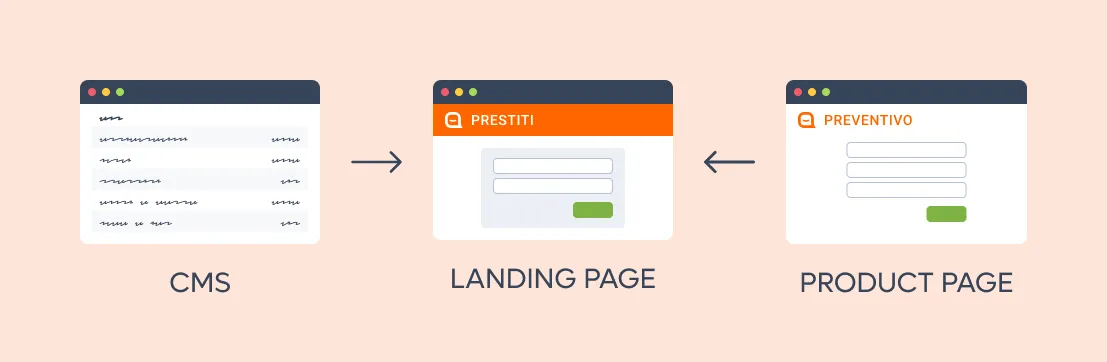
Facile.it ha diverse landing page per promuovere i suoi prodotti principali (assicurazioni, mutui, ecc.). Queste pagine sono composte da vari “blocchi” che contengono informazioni statiche provenienti da un CMS e rimandano poi alle sezioni interattive del sito, dove gli utenti possono inserire i propri dati per ricevere un preventivo.
Per ragioni di UX e SEO, Facile.it voleva permettere agli utenti di iniziare a interagire direttamente dalle landing page, integrando form dinamici all’interno dei blocchi della landing.
Questo però poneva una sfida: le landing page e le pagine dinamiche sono gestite da team diversi. Come poteva un team “fornire” una sezione dinamica in modo che un altro team potesse includerla nella landing page?
La soluzione di cui avevamo bisogno doveva permettere a tutti i team di evolvere in autonomia la propria parte di prodotto, offrendo al tempo stesso punti di integrazione flessibili.
I micro frontend dovrebbero risolvere tutto questo, giusto?
Per riepilogare, abbiamo:
- Un team che gestisce le landing page, ottenute assemblando blocchi statici dal CMS e — se riusciamo nel nostro intento — blocchi dinamici forniti da altri team.
- Diversi team che gestiscono quelle che chiamiamo pagine “dinamiche”, cioè le pagine interattive collegate dalle landing. Questi team vogliono integrare alcuni blocchi delle proprie pagine nelle landing (per esempio un form per raccogliere i primi dati dell’utente).

I micro frontend ci sono sembrati fin da subito una soluzione ovvia: abbiamo più “frontend” da integrare, gestiti da team diversi — ed è proprio per questo che è nato questo pattern architetturale.
I micro frontend, però, esistono in molte forme diverse, e non tutte sono adatte a ogni esigenza di business. Nel caso specifico di Facile.it, era assolutamente fondamentale:
- fare il server-render dell’intera pagina, blocchi dinamici compresi;
- evitare di introdurre un forte accoppiamento tra il team che gestisce le landing page e quelli responsabili delle pagine dinamiche.
Per esempio, molte soluzioni di micro frontend molto diffuse, come single-spa, richiedono un forte coordinamento tra le applicazioni front-end, imponendo per esempio l’uso di uno specifico build tool come Webpack. Il team di Facile.it aveva inizialmente valutato questa strada, ma l’ha scartata per i vincoli tecnici che avrebbe imposto ai team di sviluppo.
Un’architettura su misura
Dopo un’analisi iniziale, Buildo ha immaginato una nuova architettura che combina in modo inedito diverse tecnologie già collaudate — qualcosa che non esisteva “pronto all’uso” ed era perfettamente calibrato sulle esigenze di business di Facile.it.
Abbiamo poi costruito un MVP funzionante della soluzione: non ci siamo fermati alla prototipazione, ma abbiamo lavorato direttamente con il team tecnico di Facile.it per portare valore fin da subito.
Abbiamo documentato la soluzione, creato artifact specifici per accelerarne l’adozione tra gli altri team interni e affiancato i tech lead di Facile.it nel rendere la nuova soluzione production-ready.
Micro frontend senza un framework
Vincoli e sfide
Oltre a quanto detto sopra, abbiamo beneficiato di alcuni vincoli tecnici specifici che hanno delimitato il campo della nostra analisi:
- tutti i team di Facile.it usano React.js;
- quasi tutti i team usano Next.js;
- tutti i team condividono una libreria di Design System (anche se potrebbero usarne versioni diverse).
Le sfide principali che volevamo affrontare erano:
- integrare un “blocco dinamico” (cioè un’applicazione React a sé stante) all’interno della landing page (che è un’app Next.js);
- rendere il “blocco dinamico” disponibile da un’altra app Next.js, condividendo l’infrastruttura esistente. In altre parole: lo stesso componente React doveva poter essere usato direttamente all’interno dell’app Next.js host oppure servito come blocco a sé stante da includere nella landing page;
- ottenere tutto questo mantenendo il Server Side Rendering (SSR).
Le sfide secondarie erano:
- evitare le duplicazioni quando possibile: per esempio impedire che la stessa versione di React venisse inclusa più volte nella pagina (lo stesso valeva per altre librerie condivise come il design system);
- allo stesso tempo, non volevamo imporre a nessun team versioni specifiche delle librerie. In altre parole, volevamo lasciare ai team la libertà di usare versioni diverse di React, del Design System, ecc., ma abilitare la deduplicazione nel caso in cui usassero la stessa versione.
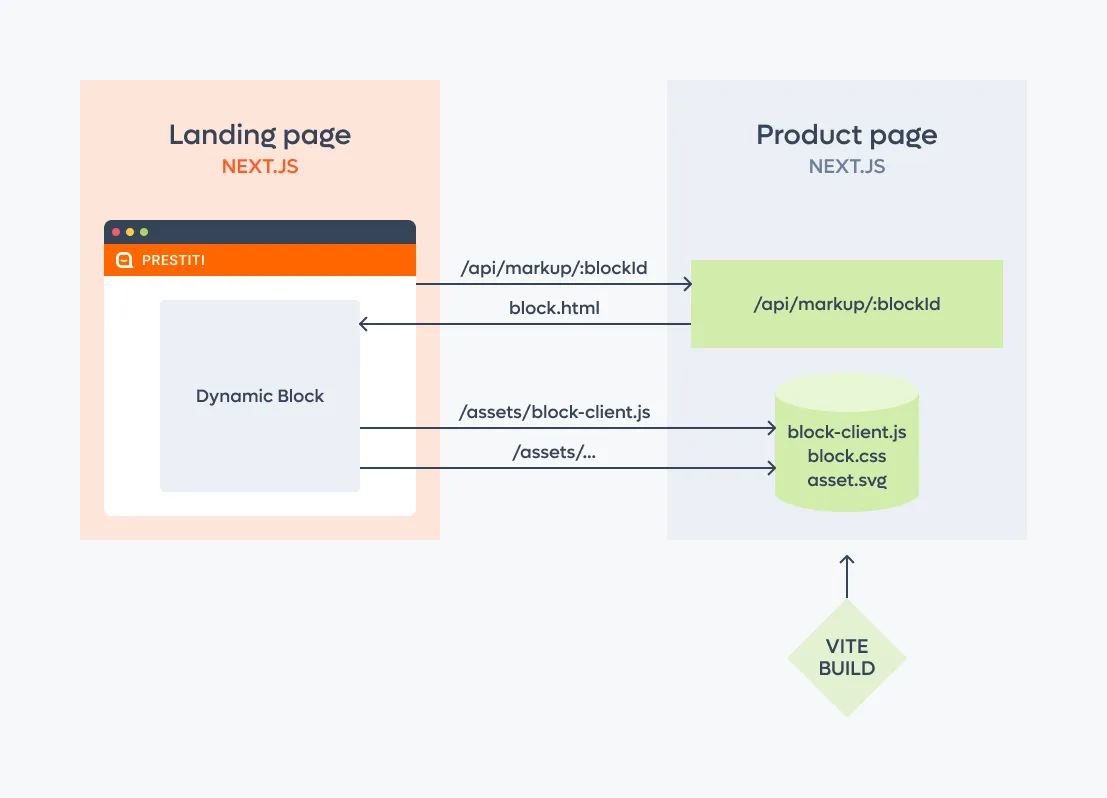
Servire il blocco dinamico
Per come è fatto, Next.js può produrre in output solo applicazioni intere, che prendono il controllo dell’intero DOM.
Ci serviva quindi un modo per fare il bundle di un singolo componente e dei relativi asset e servirli tramite Next.js.
La soluzione a cui siamo arrivati usa Vite con un’integrazione backend custom: in questo modo abbiamo potuto “impacchettare” componenti React esistenti in applicazioni a sé stanti, che potevano essere renderizzate server-side e poi servite sulla rete.
Una volta verificato che la soluzione funzionava, abbiamo potuto racchiudere tutto in un Vite plugin custom, così da nascondere la complessità e rendere semplice la configurazione per ogni team.
Allo stesso modo, abbiamo fornito una utility library per servire il componente tramite i route handler di Next.js, rendendo l’integrazione il più concisa possibile senza far trapelare la complessità interna.
Integrare il blocco dinamico nelle landing page
Nell’app Next.js che renderizza le landing page, recuperiamo dal CMS l’URL del blocco dinamico e lo “materializziamo” facendo il fetch del suo contenuto testuale.
Otteniamo così l’HTML del blocco renderizzato server-side, che possiamo poi includere nella nostra landing page usando la funzionalità dangerouslySetInnerHTML di React.
In questo modo il contenuto HTML del blocco dinamico viene inserito già durante il primo server-side render della landing page, soddisfacendo il nostro principale requisito SEO.
Evitare le duplicazioni
Includere più blocchi dinamici senza un passaggio di bundling presentava un’altra sfida: ogni blocco, così come l’applicazione host, avrebbe incluso la propria versione di React e di altre librerie comuni, come la libreria di componenti del design system.
Qui avevamo due obiettivi:
- evitare di includere due volte nella pagina la stessa versione di una dependency;
- evitare di imporre a tutti i team una versione specifica di una dependency, perché questo avrebbe richiesto un coordinamento tra i team, erodendo i vantaggi di lavorare in autonomia su parti separate del frontend.
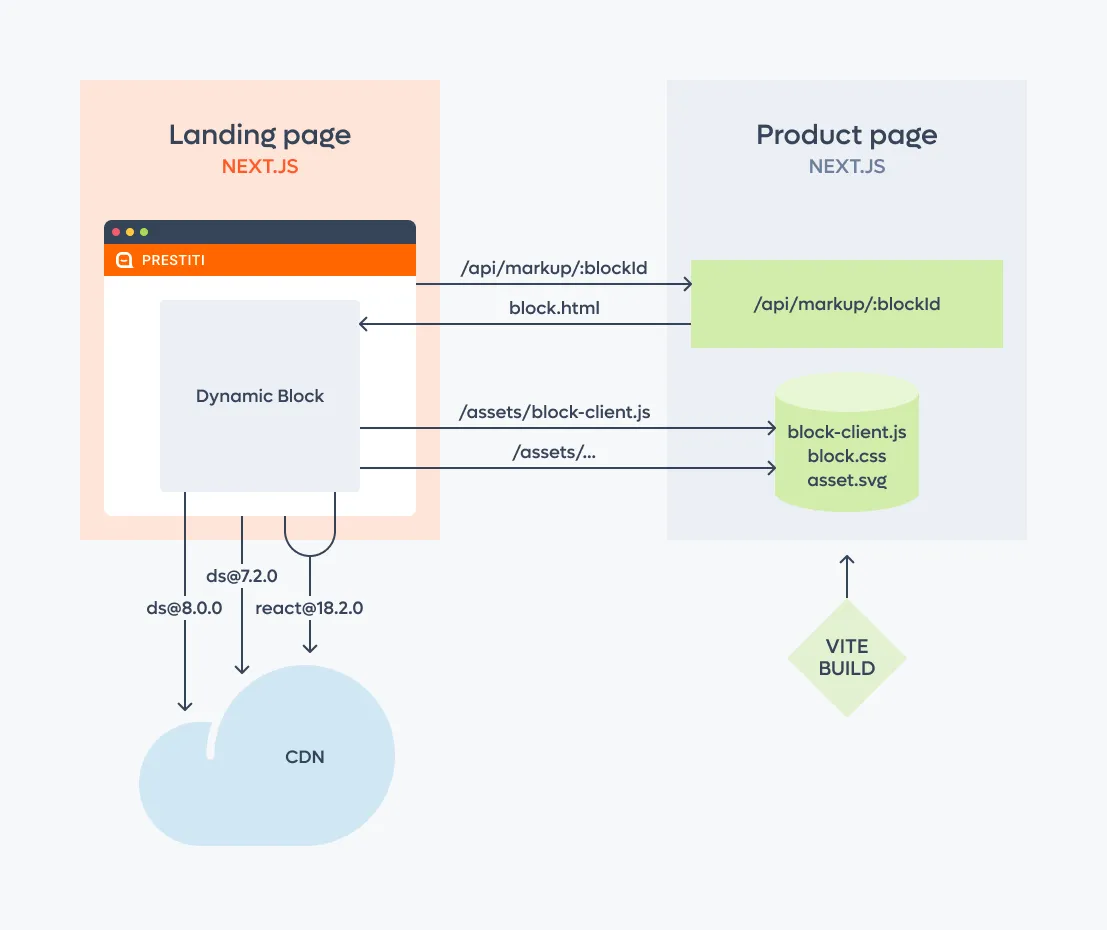
La soluzione a cui siamo arrivati sfrutta il modulo import, ampiamente supportato dai principali browser.
L’idea di fondo è che, invece di fare il bundle della dependency condivisa, l’applicazione host e tutti i blocchi importino la dependency da un url comune, nello specifico una CDN che supporta ESM, come https://esm.sh.
L’aspetto interessante è che i browser mettono automaticamente in cache e deduplicano gli import dello stesso modulo, e così otteniamo queste proprietà:
- se due blocchi dinamici importano la stessa versione di una libreria, si avrà una sola network call;
- se due blocchi dinamici importano due versioni diverse, si avranno due network call.
Questo risponde ai nostri obiettivi: ottimizzare quando possibile, lasciando comunque flessibilità ai diversi team.
Massimizzare il valore di business con soluzioni su misura
In Buildo guardiamo sempre oltre le mode tecnologiche e ci concentriamo sulle esigenze di business dei nostri clienti: è questo che ci permette di costruire soluzioni su misura, capaci di rispondere davvero ai loro obiettivi.
In questo caso abbiamo scelto di scartare soluzioni consolidate come Single SPA o Module Federation, perché avrebbero comportato troppi compromessi per Facile.it. Abbiamo invece messo a frutto la nostra profonda conoscenza delle architetture frontend per comporre componenti di più basso livello in una soluzione ben studiata e calibrata sui loro requisiti specifici.
Da allora la soluzione è stata completamente integrata, rilasciata in produzione e funziona come previsto — che è, in fondo, la metrica migliore per misurarne il successo.