At Buildo, we pride ourselves on our experience in designing and developing software solutions tailored to the healthcare and diagnostic laboratory sectors. Over the years, we’ve teamed up with the best companies in the field, applying our best practices to create systems that run more smoothly, are more precise, and keep users happy. Our journey through various projects has equipped us with valuable insights and lessons that we believe can benefit other Researchers and UX Designers entering this complex, highly specialized domain.
Unique Needs of the Healthcare and Diagnostic Industry
User research in healthcare is not like in other industries. Here, the context is not a standard office but laboratories and clinics, with physical instruments, sensitive workflows, and strict regulations. On top of that, mistakes are not just inconveniences: they can have serious consequences. This is why designing for healthcare requires extra care, empathy, and rigor, starting from the User Research techniques.
We summarized the key elements to consider before planning a research activity in a clinical laboratory or hospital, and how to handle them effectively.
In healthcare, User Research is often conducted in environments that are far from the traditional office setup. Laboratories and clinics have custom layouts designed for specific tasks, and this can greatly affect how software is used. For instance, in a laboratory, computers may be far from the area where physical tasks, such as preparing samples, are performed. A critical factor in these environments is that laboratory technicians often wear gloves and have their hands engaged in handling equipment or specimens. Keyboard navigation becomes a priority, and interactions with the system need to be optimized for minimal hand movement, such as through keyboard shortcuts. Simply asking users how they work may not be enough; observing them in their actual workspace gives you insights that can’t be captured in interviews alone.
Shadowing Methodology for Cellply’s Unique Environment
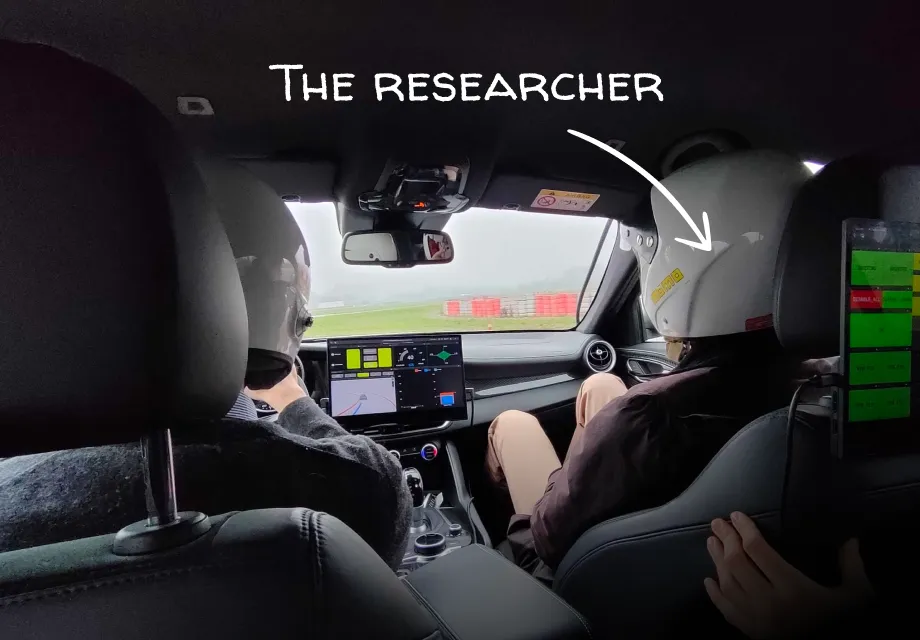
While B2B software is often tested in office environments, in the healthcare sector, as already mentioned, we cannot ignore the unique context of laboratories and clinics. These spaces, which are closely linked to physical instruments, require a different approach. To fully understand this context, we prefer to conduct shadowing sessions, observing users in their actual workspaces. This allows us to see how they interact with their environment, the spaces they move in, and the tools they use.
At the beginning of our long collaboration with CellPly, we spent some time inside their laboratories. This was an essential step to truly understand the context in which we would work (and a fun experience, too!). One key observation was the spatial arrangement of the lab—biologists filled plates with reagents far from the computer where they used the software. This led us to realize that software instructions alone wouldn’t be enough, so we added a feature to print reagent maps to bring to the work area.
Understanding the spatial context wasn’t the only gain from our immersion in the biologists’ daily life. We also learned a lot about their domain. Many words we heard before, from abstract technical terms, became concrete objects. We started to understand better their struggles and the purpose of their work.
Still curious? Read the full case study: Cell Therapy Software Design for CellPly
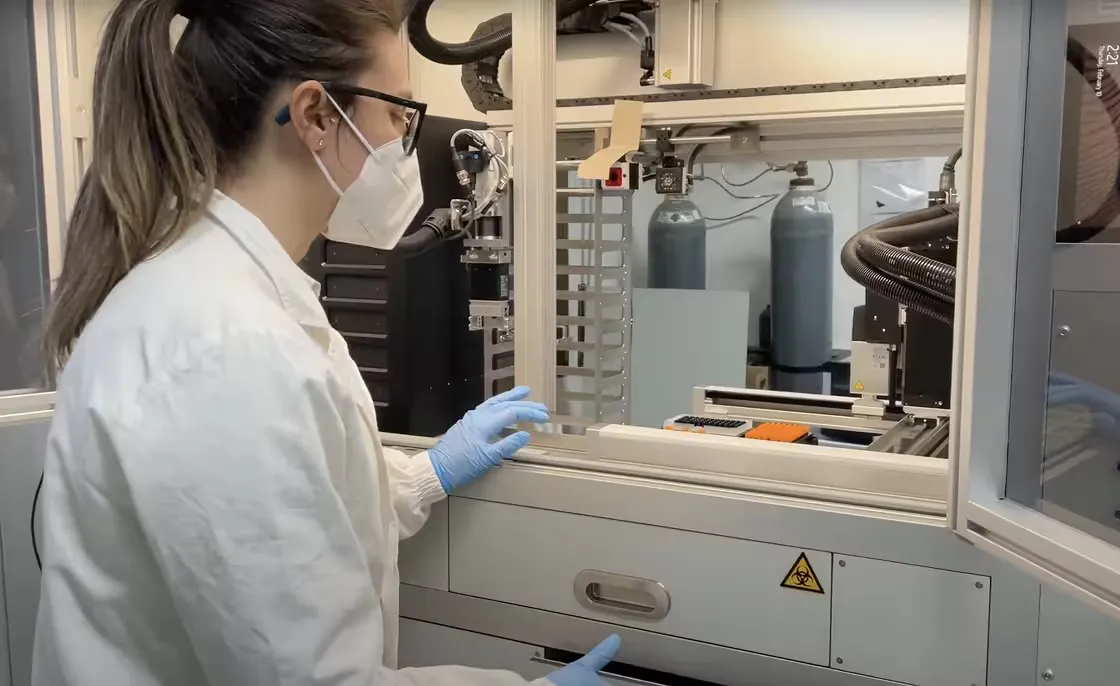
Biologist working in a laboratory
Speaking the Language of Healthcare
One of the most common challenges in healthcare design is the use of highly specialized, technical language. Each healthcare field has its own jargon, and even within a single organization, roles such as doctors, nurses, field service engineers, biologists, and technicians may use different terms to describe the same processes or tools. As designers or researchers, we need to understand this terminology and create a shared language between the team and the users. By building a glossary of key terms and ensuring everyone is on the same page, communication becomes smoother, reducing misunderstandings.
A shared glossary with Brooks Automation
For Brooks Automation, we designed the control software for their laboratory automation device.
To fully enter their domain, an essential part was the building of a shared glossary.
In this glossary, we tracked different types of terms:
- Brooks Automation jargon. Some terms are meaningful only within the organization or have a different meaning outside. These terms are the trickiest because they can be regular words with a different meaning, leading to confusion. Plus, the meaning isn’t always clear to the client team, so it’s beneficial for everyone involved to clarify it.
- Technical terms used by the Brooks Automation technical team. Clarifying the meaning of these terms is necessary to ensure we are on the same page when communicating and avoiding miscommunication. They can be very useful for writing internal documentation and requirements, but cannot be used in the interface, as they belong to a different domain.
- Terms commonly used in the medical field, but not familiar to us. We tracked these terms to help our team navigate the domain and to have meaningful conversations with stakeholders and end users. These terms can also be used in the interface copy, as they are familiar to the target users.
Be careful: sometimes your interlocutors think a term is clear within their domain, but it’s not, so test each technical term with multiple users before using it in the interface copy!
For example, we needed to add Sample Turnaround Time (TAT) in our analytics dashboard. It seems a clear concept in the analytics laboratory environment, but we discovered there are at least three different ranges of time that can be called Sample TAT:
- From the sample check-in in the laboratory to the final test, used to measure the laboratory’s efficiency in delivering results.
- From the sample check-in in the laboratory to its storage, which is used to measure the laboratory’s overall efficiency in managing the workload.
- From the sample collection to the final test on it, which is essential to ensure test reliability.
Each Sample TAT is interesting to different users, so it is essential to clarify the term to know where to display the data and to describe its meaning to the user.
Privacy & Data Access Barriers
Privacy and confidentiality are fundamental in healthcare, especially when working with patient data. This means that many tools and resources may be restricted due to legal and ethical concerns. For example, access to patient records or lab results may be highly controlled, and often, as designers, we face frustrating barriers. We may not have direct access to real data or may be restricted from viewing key screens or environments that are essential for designing the product. These limitations can make it difficult to fully understand the context of use and how the software interacts with sensitive information.
Using the Service Team to Map User Pain Points
In certain situations, such as when direct access to patients or hospital environments is restricted, we need to find alternative ways to understand user pain points. In collaboration with a large healthcare and diagnostics company , we worked closely with their field service engineers and analyzed support tickets to gain insights into the challenges users faced with the software. By reviewing these tickets, we could identify recurring issues, bottlenecks, and areas where users struggled, allowing us to map out the pain points and better understand the root causes of frustration.
This approach proved invaluable for obtaining real-world feedback, even without direct access to clinical settings. It enabled us to prioritize software improvements based on the actual experiences of users in the field.
So, take a moment to look around you: who holds the keys to your users’ experiences? You might be surprised to find that the answers are already within your reach, waiting in departments you simply haven’t thought to ask.
Diverse User Roles, Needs, and Digital Literacy Gap
Healthcare environments are made up of a diverse range of roles, each with its own set of responsibilities and workflows. From doctors and nurses to laboratory technicians and administrative staff, each user group has distinct needs and challenges. Roles such as doctors are often not direct employees of the clinic, which means their priorities may differ from those of in-house staff. Designers need to understand these differences in user roles to create solutions that meet a broad range of needs.
Also, while healthcare tools can be highly technical, the level of digital literacy among healthcare professionals varies widely. Some users may be highly skilled with advanced tools, while others may struggle with more complex digital systems. During user research, it’s necessary to identify these differences early on and adapt the methods and the future user experience accordingly, to make the medical products more accessible.
Here’s a fun (and a bit out-of-the-box) example we came across during a client deep dive. In one laboratory, the team had come up with a rather creative solution to help less tech-savvy users navigate the software. Since the software’s UX was way too complex to understand, they decided to print the instructions and shortcut keys and stick them on mousepads. These mousepads served as mini-manuals for users who needed a little extra help. It’s definitely not the solution we’d recommend rolling out in every lab, but it shows how far people will go to make complex software more approachable.
Ultimately, avoiding ‘mousepad cheat sheets’ isn’t about simplifying for the sake of it, but about tuning in to our users’ reality. We must be willing to invest the necessary time in research to understand who we are designing for.
Understanding Healthcare Roles for a Hospital Management Mobile App
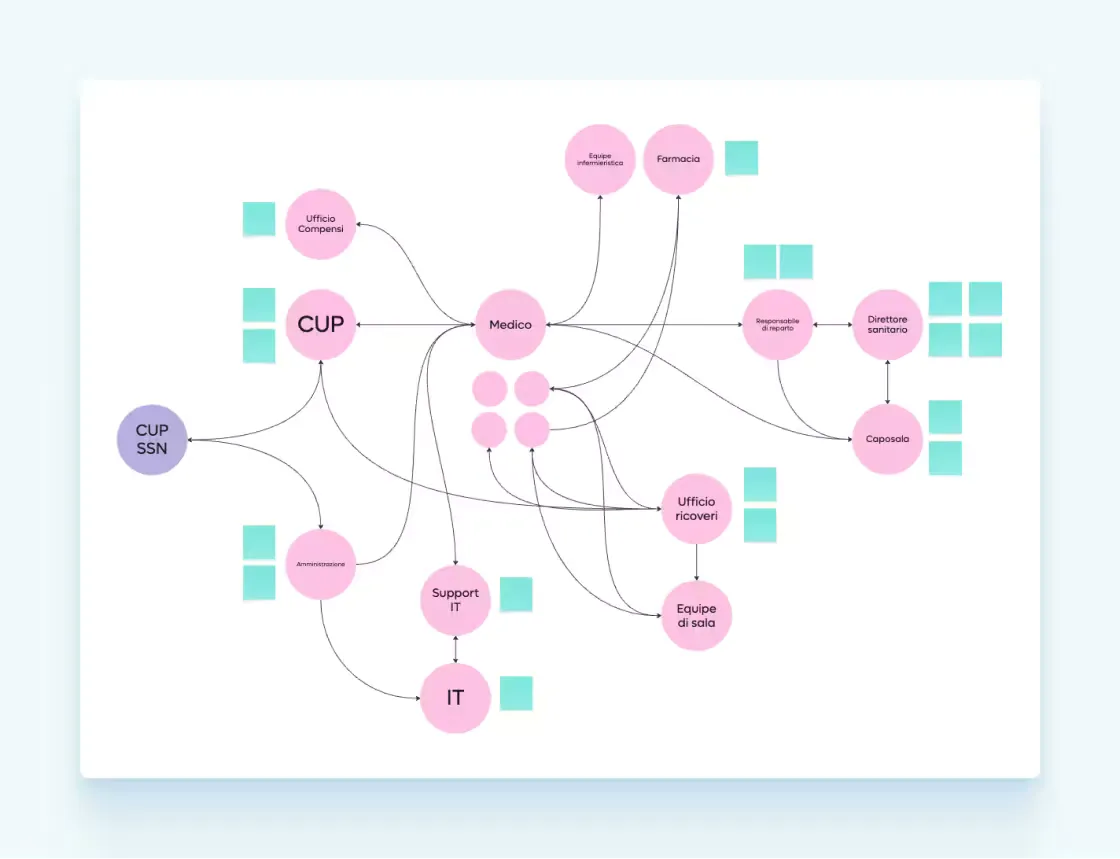
Not only laboratories but also clinics are complex organisms that should be deeply understood to design for them. While we may think we understand roles like doctors, nurses, or receptionists, deeper investigation reveals just how intricate these environments are. Many healthcare professionals, especially doctors, have limited time to participate in research or learn new tools, as they often prefer working with paper and pen. Even though they are highly technical in their fields, some may not be as comfortable with digital tools.
We learned this while conducting research for a company launching a new mobile application paired with its clinic management software. Doctors, who are often not clinic employees but stakeholders working across different hospitals , may choose not to adopt new solutions if they find them unhelpful or difficult to use. Through user interviews , we discovered that doctors needed tools that supported their mobility. A mobile app was the ideal solution, so we focused on features that allowed doctors to manage their tasks while adhering to clinic standards. Workshops and interviews with hospital staff across various roles helped us align the application with both management and doctor needs, benefiting everyone involved.
Sector-Specific Standards
Healthcare is a highly regulated industry: from ISO certifications to specific clinical guidelines, there are many rules to follow when designing software for healthcare environments.
Specifically, quality and verification processes significantly impact the design and requirements definition phases, as well as the User Research and User Testing steps, requiring strict compliance with the client’s Quality frameworks.
Adapting User Research to Regulatory Standards
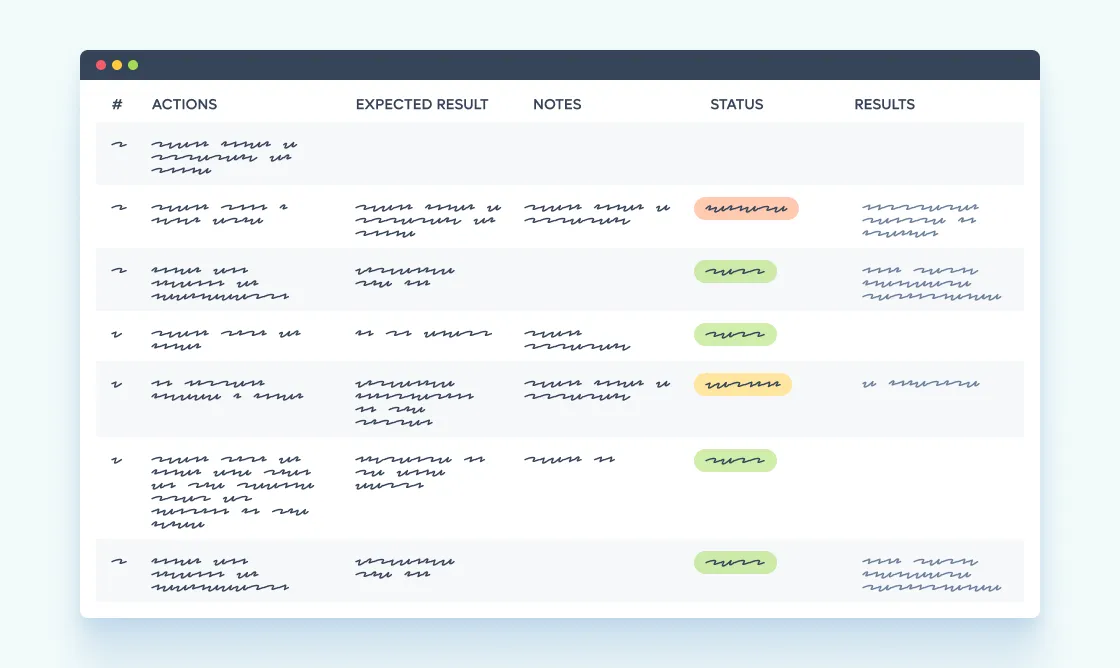
When working with a client in the healthcare sector, understanding the industry and its specific regulations was essential to adapt our user research techniques to meet their standards. For this client, regulatory and quality guidelines required us to perform formal tests focused on verifying that the software worked as intended, rather than conducting usability tests. The initial format provided by the client, designed for Validation Test Cases (VTCs) , was structured around instructions for users and validating functionality, not usability.
However, since usability testing is a fundamental part of our process, we worked closely with the client to adapt their testing format. Starting from their provided VTC format, we successfully got approval to include usability testing by revising how we tracked and documented the testing scripts and results. We ensured our approach aligned with the client’s expectations and protocols and was compatible with the required regulatory documentation, enabling us to collect valuable usability feedback from target users.
Focus on accessibility
Inclusivity and accessibility should be considered in all industries, but in healthcare, it is even more important because the elderly and people with disabilities are often a big part of your target audience.
When you plan your user research phase, you can focus on accessibility by:
- Conduct an accessibility audit of the AS-IS to identify areas requiring remediation.
- Conduct usability tests of the AS-IS with older adults and people with different disabilities to capture their struggles and observe how they interact with the product. Focus specifically on people who use assistive technologies to navigate.
- In every research activity you plan (survey, user interviews, etc.), be sure to include older adults and people with disabilities in your panel.
- If you work with personas, create even personas that are older or personas with disabilities.
Accessibility tests with Vivisol
Vivisol offers therapies at the patient’s home. Given that a significant portion of their customers have mobility issues, they decided to focus on improving the accessibility of their touchpoints.
We executed an accessibility audit of their website. To ensure autonomy for their customers when booking appointments, we also conduct usability tests of the booking flow with people who use assistive technologies.
Thanks to the tests, we found that a UI component that works perfectly with the mouse and keyboard reacts unexpectedly to some wheelchair joysticks, preventing the user from completing the flow.
Moreover, we observed that some steps were particularly tiring or difficult for some of our users, which provided valuable insights to improve the user experience.
Closing Thoughts
Before we wrap up, let’s quickly recap the pillars of effective research in this domain:
- Context is king: step out of the office and use shadowing to understand physical constraints in labs and clinics.
- Speak the language: build shared glossaries to bridge the gap between technical jargon and design.
- Navigate barriers: find creative ways (like leveraging support tickets) to gather insights when privacy rules limit direct access.
- Mind the gap: design for a wide range of digital literacy , from tech-savvy technicians to traditionalist doctors.
- Embrace compliance: don’t fight the rules; adapt your testing methods to fit regulatory standards.
- Include everyone: make accessibility a priority by auditing and testing with diverse user groups.
After more than a decade in the industry, we know that User Research is the only way to navigate the complexity of healthcare and build products that people can trust. It’s an ongoing journey of discovery, and we hope the insights shared here will help you kickstart your research efforts.
However, the work doesn’t stop at understanding the problem. Keep an eye out for our next post, where we will dive deep into the solution side, covering essential UX design best practices specific to healthcare.