

From Spreadsheet Overload to a Smarter System
From fragile Excel processes to a scalable Task Manager: how we helped an organization reduce manual work, improve forecasting accuracy, and embrace a sustainable digital evolution.

From fragile Excel processes to a scalable Task Manager: how we helped an organization reduce manual work, improve forecasting accuracy, and embrace a sustainable digital evolution.
 Stefano Sambruna
 Working with complex organizations often means dealing with all kinds of challenges: multiple teams, overlapping responsibilities, and processes that need to run smoothly without causing disruption. And in these environments, Excel becomes a sort of invisible legacy system : incredibly flexible, widely used, but also fragile and risky when it ends up supporting critical operations. It’s not the kind of request a software house usually gets, but it’s exactly the kind of challenge that fits us perfectly. We’re used to tackling widespread, messy problems with an incremental, pragmatic approach (we’re not just people who “write code”) as a partner who can guide a sustainable digital transformation.
That was precisely the situation for the division we worked with, responsible for planning and managing large-scale projects.
Their daily routine meant juggling dozens of spreadsheets, constantly updating data, and keeping forecasts accurate, all while trying to minimize the ever-present risk of human error.
The challenge was clear: how do you reduce inefficiencies without blowing up workflows that people rely on every day?
Our solution wasn’t to eliminate Excel, but to elevate it, working together with the stakeholders. In the next sections, we’ll walk through the challenges we faced, the decisions we made, and the lessons learned about turning everyday tools into sustainable digital solutions.
For years, the teams relied heavily on Excel to manage critical forecasting and planning tasks. While familiar and flexible, this approach introduced several issues:
The real challenge was not only technical, but also organizational. The goal was to improve efficiency without disrupting well-established routines. In fact, we knew that introducing a new tool too abruptly could risk creating more friction than benefits.
Another significant obstacle was the extensive reliance of the stakeholders’ tasks on Excel files, which, due to their nature, are highly flexible and undergo frequent changes. These alterations can occur due to purposeful decisions or unintentional errors. Therefore, we had to balance accommodating changes in Excel files with establishing solid design structures to ensure a robust and reliable task.
In other words, the challenge was not to eliminate Excel, but to evolve it into a more structured and trustworthy system, helping users maintain familiar routines while reducing inefficiencies and risks.
Before writing a single line of code, we took the time to really understand how things worked in the real world. That meant diving deep into the current processes: how Excel files were used every day, which operations were eating up the most time, and where mistakes tended to sneak in. Instead of proposing a big, disruptive overhaul (the kind nobody actually wants), we shaped a TO-BE scenario that could grow gradually, slot into existing routines, and feel like a natural evolution rather than a revolution.
At the core, our approach revolved around two simple ideas:
In practice, this took shape through several components working together:
One choice we’re especially proud of: introducing KPI tracking. Every time a task ran, it generated data points the business could actually use, turning day-to-day operations into insights that support long-term planning and smarter decisions.
The breakthrough didn’t come from building a new tool, but from building a shared understanding of how people actually worked, and why things kept breaking. Through workshops, prototypes, and plenty of screen-sharing sessions (“show me exactly how you do this”), we shaped what eventually became the Task Manager. Instead of positioning it as yet another system to replace Excel, we designed it as a pragmatic assistant : something that could quietly handle all the repetitive, risky, and frustrating parts of the workflow while letting people keep using the spreadsheets they already trusted.
How does the product work? A user starts with one or more Excel files and chooses what they want to do. Before doing anything, the system checks that the files make sense: it looks at their structure, the type of data inside, and whether everything is consistent. If something’s off, the user immediately gets a clear report explaining what needs fixing, no guesswork, no broken formulas.
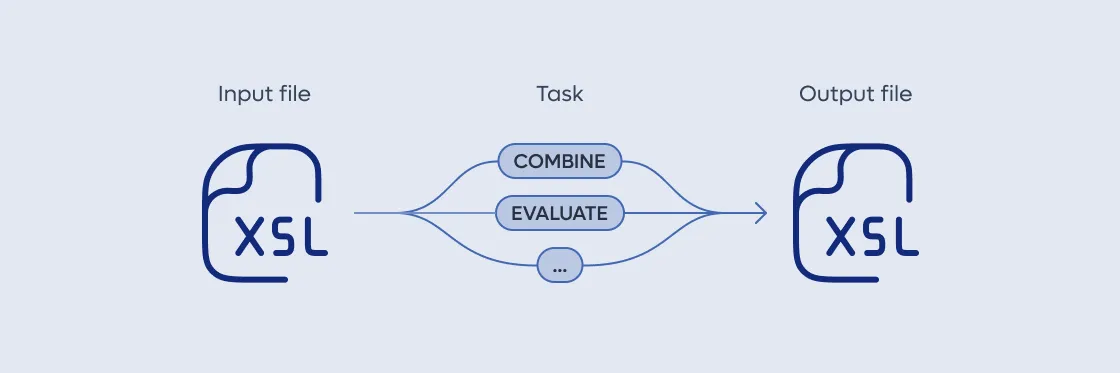
If everything is correct, the Task Manager performs the operation (for example, combining two models) and gives back a clean, ready-to-use file. Along the way, it also generates a transparent execution report, so users always know what happened and why.
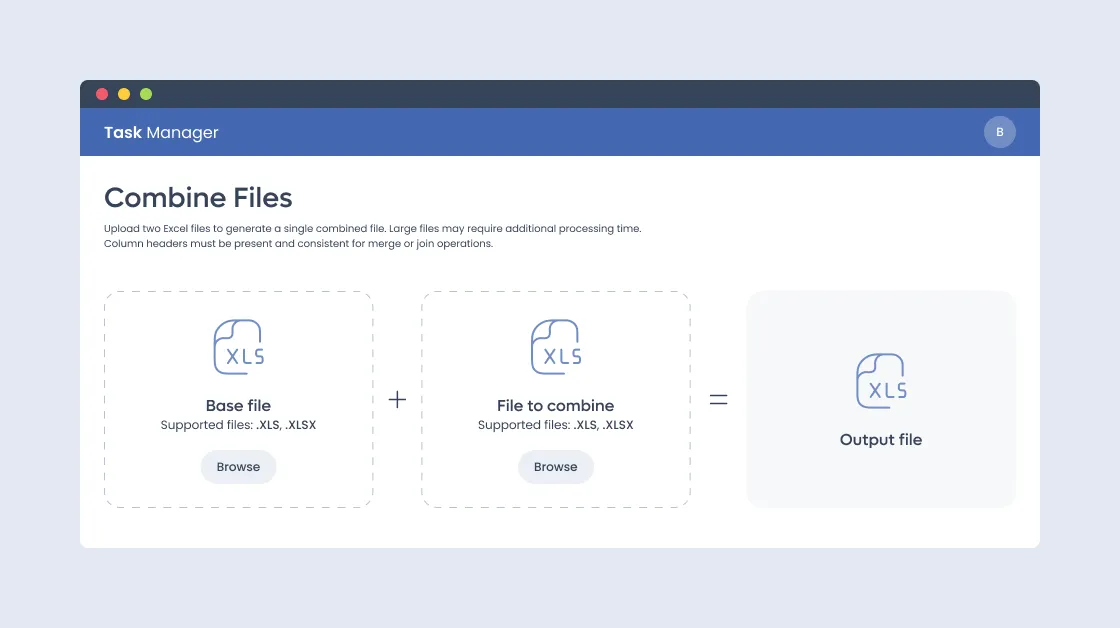
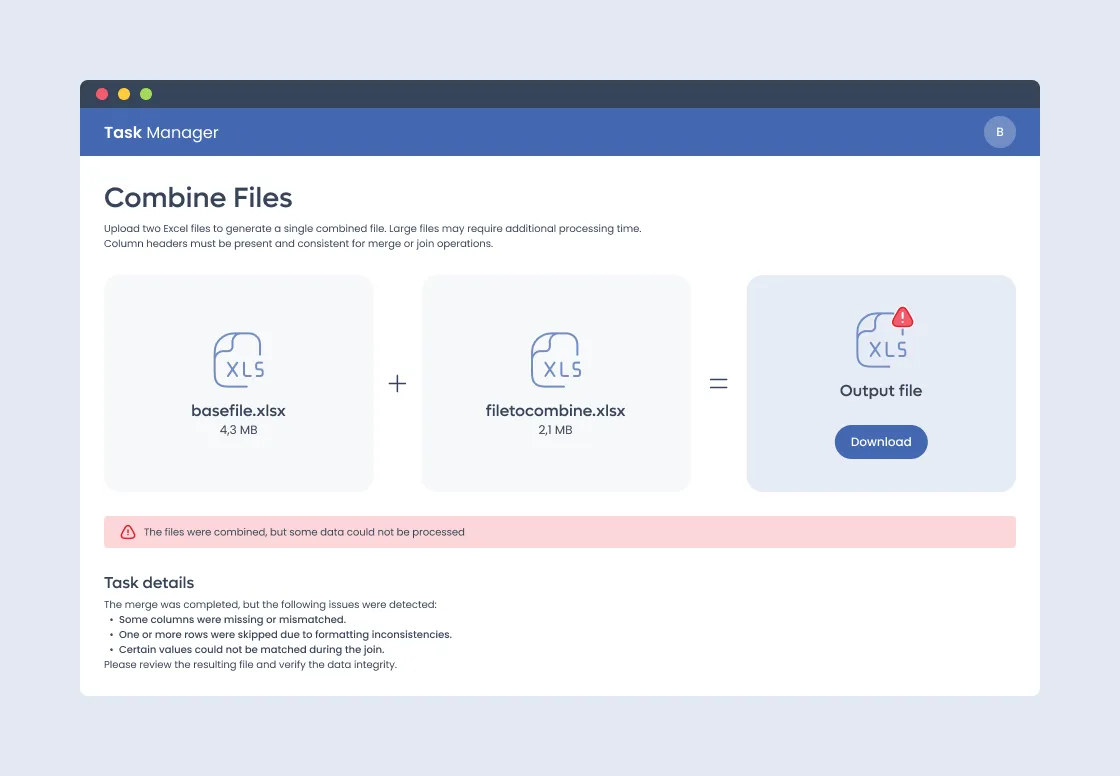
This approach drastically reduced the time dedicated to manual tasks, and over time, we saw a medium-term improvement in the quality and precision of Forecasting activities. Teams could finally focus less on monotonous operations and more on higher-value tasks.
And because every task execution generated KPIs behind the scenes, the organization gained something Excel alone had never been able to offer: visibility. Suddenly, they could understand bottlenecks, identify recurring issues, and plan with data rather than assumptions.
As we discussed, the application relies on tasks that receive file inputs and perform validation and operations over them. Let’s take a deeper dive into how the checks are performed.
Once the inputs are loaded into the task, Task Manager will perform a structural validation check to ensure that all relevant sheets, columns, and cells are present. It will then perform a data validation check, including standard checks such as data types and mandatory values, as well as more custom task-specific checks (e.g., cell A4 must contain a number greater than 10). Should these checks fail, the user will receive a validation report with a clear list of all identified errors and instructions on how to resolve them. After passing the validation check, the Task Manager will perform the task’s operations by extracting and processing relevant data, ultimately producing an output file that the user can download directly from the platform.
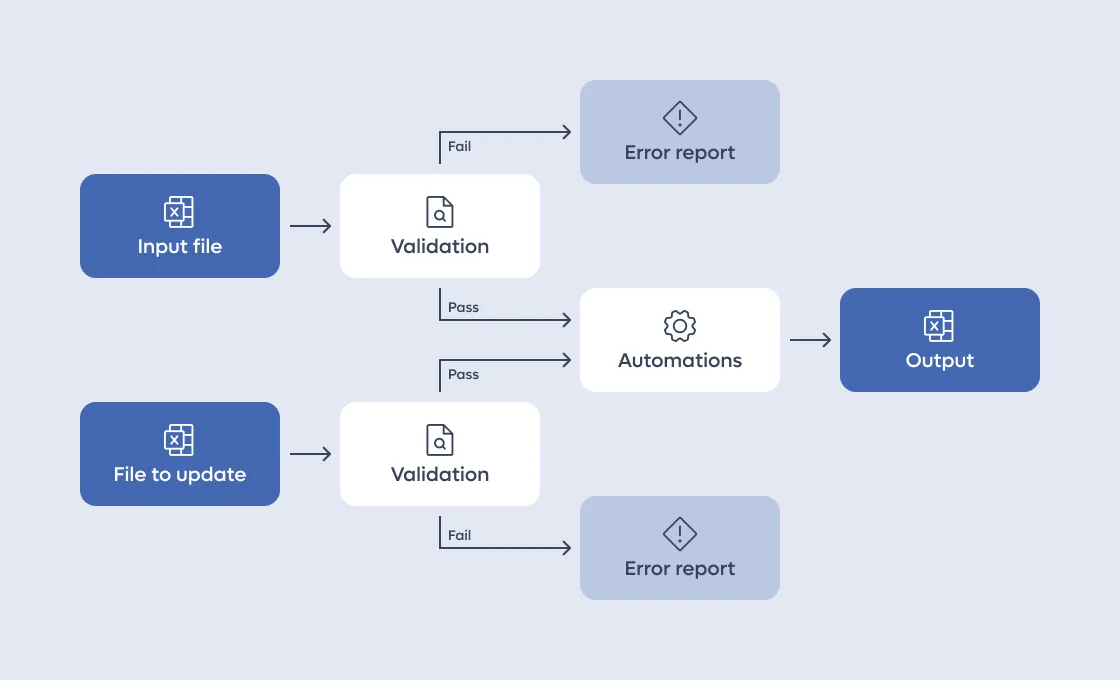
This lifecycle made the system transparent and trustworthy: users never felt like they were handing over control to a “black box,” but instead working with a reliable assistant.
The strength of this application lies in its remarkable flexibility and scalability. It is possible to evolve a task or add new ones based on user needs without having to redesign the whole system. The ease of adding new tasks makes Task Manager an excellent solution for companies that have this type of requirement and want to approach change gradually. Indeed, once the application’s backbone was developed and the first task added, users began using and testing the application immediately, gaining significant benefits right away while we were still developing the subsequent tasks needed to fulfill the entire contractual objective.
In practice, this meant that Task Manager was not just a one-off solution, but a living system , capable of growing with the organization.
The Task Manager project exemplifies how tailored technological solutions can significantly enhance efficiency and precision in project management. By focusing on automating and validating Excel-based tasks, which are pivotal in the processes of the division we worked with, the solution has streamlined operations and improved the accuracy of forecasting activities.
The operational dashboard and the suite of automated tasks have effectively reduced the burden of manual tasks on the stakeholders, enabling them to dedicate more time to strategic decision-making and less to mundane data manipulation. The Task Manager’s flexibility and scalability mean it can adapt to evolving business needs, ensuring long-term relevance and utility.
Moreover, the implementation of the Task Manager has demonstrated substantial improvements in user satisfaction and operational efficiency. Stakeholders now enjoy a less stressful environment, free from the errors and inconsistencies that manual handling of Excel files often introduces.
All this shows that digital transformation doesn’t always mean radical disruption. Sometimes the most effective path is to evolve existing practices, keeping what works and automating what doesn’t.
This project shows the value of a human-centered approach to technology : one that respects established workflows while introducing the right level of innovation to make operations more efficient, accurate, and future-proof.
Stefano is a full-stack software engineer with a strong attention to user experience and product quality. He enjoys shaping interfaces that feel simple, consistent, and meaningful, balancing technical depth with design sensitivity.
Ogni mese scegliamo articoli utili ma anche idee fresche e stimolanti. Proprio quello che vorremmo trovare noi in una newsletter!